Audio, video and queued files
Drag in one or more files: MP3, WAV, M4A, FLAC, MP4, MKV, MOV and more. They are transcribed one after another.
Trascrittore Audio for Windows turns recordings, meetings, lectures and videos into text and subtitles. Work on your own PC without sending your audio to anyone.
Windows 11 or 10, 64-bit · no registration: all features, the first 10 minutes of each file
If Windows shows a warning at startup, click More info, then Run anyway.
Video and screenshots show the Italian version of the program.
Version 1.1 · Features
From your file to ready-to-use text: synchronised playback, AI review, subtitles and documents in one program.
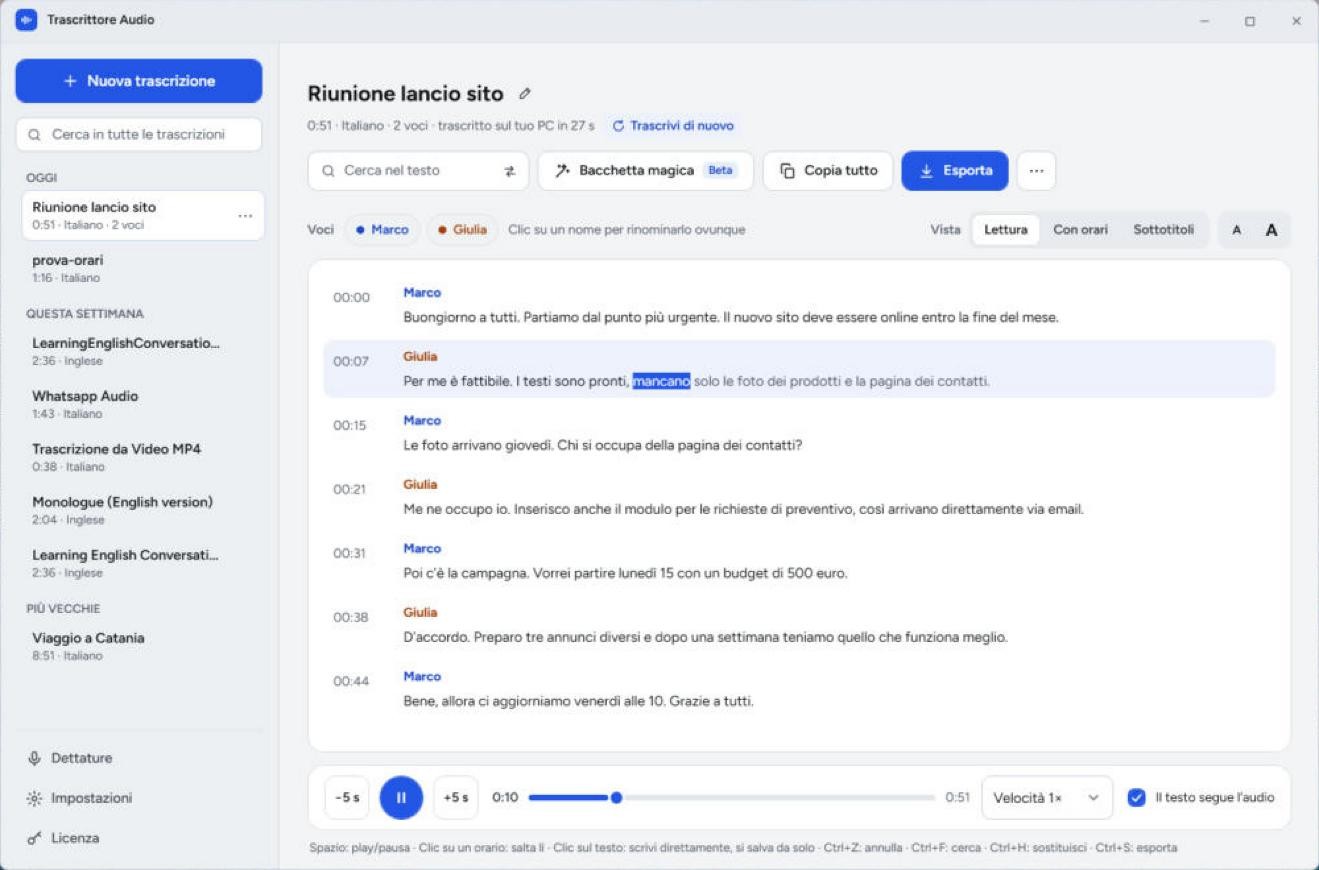
Text follows the audio word by word. Edit the transcript directly: changes save automatically and timestamps stay synchronised.
Drag in one or more files: MP3, WAV, M4A, FLAC, MP4, MKV, MOV and more. They are transcribed one after another.
Videos and podcasts from over 1,700 sites, without downloading files manually.
Playback from 0.5× to 2×, five-second jumps, find and replace. Split or merge sentences and undo changes.
Suggestions to check, summaries, key points, translations and custom actions. Online services or local AI, in beta.
Text, Markdown, HTML, CSV, JSON, SRT and VTT. Premiere Pro XML, timecode and translated exports retaining timestamps.
Automatic or manual language selection, speaker names and custom vocabulary. Automatic substitutions for recurring mistakes.
Send text and title to Zapier, Make, n8n or your own service, or export to a folder such as an Obsidian vault.
Search transcripts, choose retention periods and view processed minutes and reported service costs. Light or dark theme.
From a file to ready-to-use text, in nine screenshots.
Graphics card, CPU or four online services: choose how to transcribe for each file.
Choose Groq, AssemblyAI, OpenAI or ElevenLabs. Audio is sent to the selected service; any service charges are separate from the program licence.
Transcribes on your PC using a compatible recent NVIDIA, AMD or Intel graphics card, optimised for speed.
Works on any 64-bit Windows PC, even without a dedicated graphics card. Slower, but functional.
No complicated setup.
Online for maximum speed, or on your PC for maximum privacy.
Audio or video: the program extracts the audio and transcribes it, showing progress.
Edit and save as Word, PDF, text or subtitles. Export for Premiere Pro too.
With the Chrome and Edge extension, read voice messages instead of listening: press “Transcribe” and the text appears below the message. It can transcribe on your computer without sending the audio to anyone.
Coming soon to the Chrome Web Store
Not affiliated with or endorsed by WhatsApp or Meta.
39 €59 €
one-time payment
Your licence key arrives by email. Prefer to try it first? Download the free trial
Turn recorded videos into searchable text or subtitles without publishing them online.
Read explanations and find important passages without listening to the entire lecture again.
Create a transcript to review for interviews, dissertations and qualitative research, while keeping sensitive audio local.
Turn a saved meeting recording into readable text. The program does not join calls or record meetings for you.